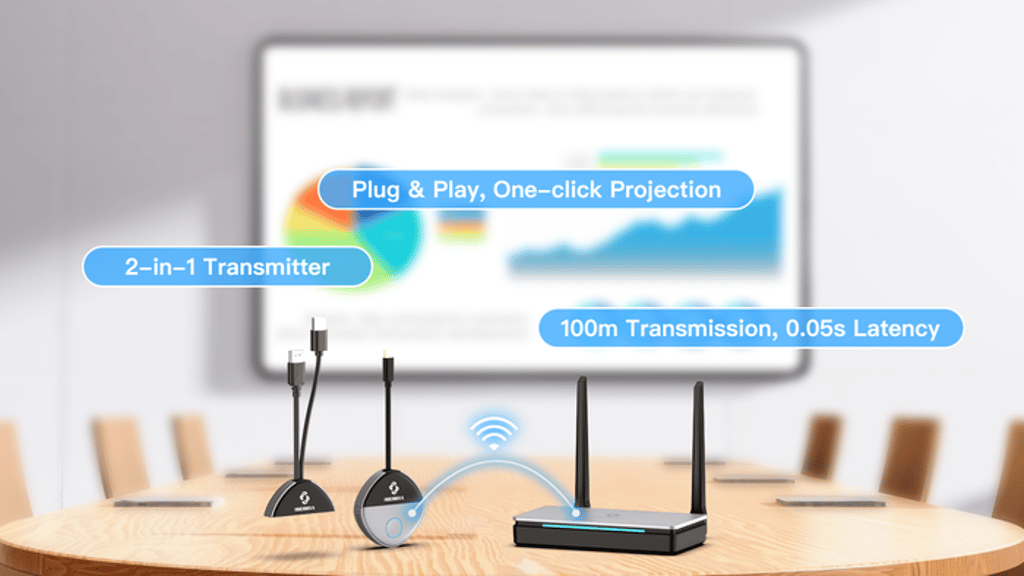
How do I make the product work?
Don’t worry—our quick start guide covers everything.
1.Connect the receiver to the large screen display’s HDMI port. 2.Plug the transmitter into the laptop. 3.Stick the pin into the receiver bottom “pair hole” more than 5 Second, and it will enter to the pairing mode.
That’s it! Your devices should pair automatically.
Last updated: May 08, 2025 01:59
What is the transmission distance of the Wireless Transmitter and Receiver?
The Wireless Transmitter and Receiver supports a maximum range of up to 100 meters (328 feet) in open space. It’s designed with powerful wall-penetrating capabilities, allowing stable signal transmission even through multiple walls or obstacles.
Last updated: April 18, 2025 01:53
What devices are compatible with this product?
Simply plug in the transmitter—whether it’s a smartphone, tablet, or laptop—and it instantly transmits. (*All mobile devices with Alt Mode Type-C output are compatible.)
Then, display on the receiver—whether it’s a TV, monitor, or projector. (*All display devices with HDMI input are compatible.)
Last updated: May 08, 2025 01:59
What are the shipping and delivery plans?
One week after the campaign ends, we’ll send out a survey via email to collect your shipping information. Rewards are scheduled to ship in June 2025 via air freight, with estimated delivery times of around one week depending on your location.
Last updated: April 18, 2025 01:53
What are the items included in the reward?
Each reward package includes the following items:
Wireless HDMI Transmitter + USB Wireless Receiver Type-C Charging Cable Power Adapter
Bonus: 3.3ft HDMI Cable (included as a free gift)
Last updated: May 08, 2025 01:59
Can the WHD-5000 connect to multiple receivers?
The system supports up to 32 transmitters connected to a single receiver, allowing multiple users to share the same display by switching between transmitters.
Last updated: April 18, 2025 01:53
Does the WHD-5000 require an internet connection, Bluetooth, or an app to function?
No. The WHD-5000 works completely independently—no Wi-Fi, Bluetooth, or app downloads required. Just plug it in and start streaming directly from your device to any TV, monitor, or projector with ease.
Last updated: April 18, 2025 01:53
What's the difference between this and Google Chrome, other than yours is much bigger?
Google Chromecast is essentially a personal-use media player (media player or OTT box).
After purchase, users must go through a number of setup steps, especially requiring a stable internet connection and a Google account login to function.
In contrast, our WHD-5000 supports both corporate wireless presentations and personal home entertainment, making it suitable for multi-scenario use.
Most importantly, it requires no software installation, no network configuration, and is truly plug-and-play. Users can enjoy full functionality without any restrictions right out of the box.
Last updated: May 29, 2025 02:00
Does it support HDCP?
Yes, the WHD-5600 supports HDCP and is compatible with most content-protected HDMI sources.
Last updated: May 29, 2025 02:00
How do I pledge?
To make a pledge, simply click the green “Back this project” button at the top of the page. Then, select your shipping country, choose your preferred reward tier, and complete your pledge—it’s quick and easy!
Last updated: May 29, 2025 02:00
Have questions? Join our official community!
Share your experiences, get helpful tips from other users, Plus, enjoy giveaways and special limited-time events! Join here: m.me/392643067270286
Last updated: May 29, 2025 02:00
What is BackerKit?
BackerKit is a service that crowdfunded project creators use to keep track of hundreds to tens of thousands of backers—from shipping details, pledge levels, preferences and quantities, whether they have paid or had their card declined, special notes, and everything in between!
The BackerKit software and support team is independent from the campaign’s project team—BackerKit does not handle the actual reward shipping. For more information about the preparation or delivery status of your rewards, please check the project's updates page.
How does BackerKit work?
After the campaign ends, the project creator will send you an email with a unique link to your survey. You can check out a walkthrough of the process here.
I never received my invitation. How do I complete the survey?
The most common reasons for not receiving a survey email is that you may be checking an email inbox different from the email address you used to sign up with Kickstarter, Indiegogo or Tilt Pro account, or it may be caught in your spam filter.
Confirm that the email address you are searching matches the email address tied to your Kickstarter, Indiegogo, or Tilt Pro account. If that doesn’t work, then try checking your spam, junk or promotions folders. You can also search for "backerkit” in your inbox.
To resend the survey to yourself, visit the project page and input the email address associated with your Kickstarter, Indiegogo or Tilt Pro account.
How do I update my shipping address?
BackerKit allows you to update your shipping address until the shipping addresses are locked by the project creator. To update your address, go back to your BackerKit survey by inputting your email here.
When will my order be shipped, charged or locked?
That is handled directly by the project creator. BackerKit functions independently of the project itself, so we do not have control of their physical shipping timeline. If you want to check on the project’s status, we recommend reading over the project's updates page.
I completed the survey, but haven't received my rewards yet. When will they arrive?
As BackerKit does not actually handle any rewards or shipping, the best way to stay updated on the shipping timeline would be to check out the project's updates page.